
Download Unicode Chars Generator – Unicode Symbols, Emojis, Math Characters
Overview
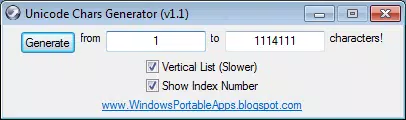
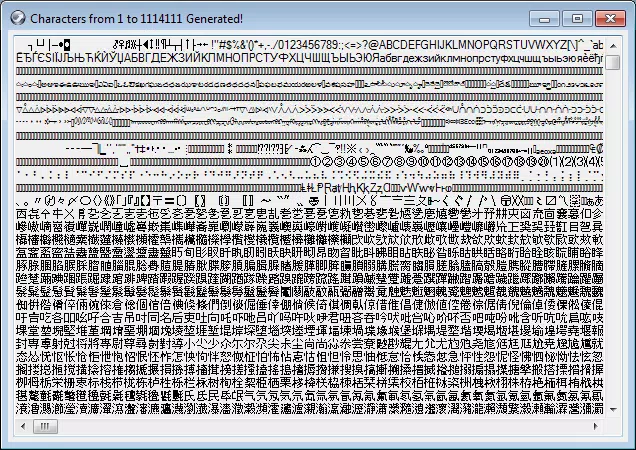
Unicode Chars Generator is a specialized utility designed for developers, designers, and tech-savvy users who require access to a broad spectrum of Unicode characters. The app enables users to generate characters across the full Unicode range, from code point 1 to 1,114,111, which encompasses scripts, symbols, mathematical operators, and emoji. Its primary purpose is to simplify the process of locating and using rare or non-standard characters that may not be readily available on standard keyboards. This functionality is especially valuable in web development, UI/UX design, programming, and multilingual content creation. The tool addresses the common challenge of manually searching for obscure characters or relying on external resources that may lack consistency or reliability.
Target users include software engineers working with international text, graphic designers incorporating unique symbols into branding, and educators preparing multilingual materials. The app’s straightforward design ensures accessibility even for those without deep technical knowledge. Although the developer did not provide additional background information, the app’s focused functionality suggests a niche but practical purpose within the mobile productivity ecosystem. Real-world use cases include inserting special characters into code, generating decorative text for social media, or testing font rendering across platforms. In the broader app landscape, Unicode Chars Generator fills a gap for on-the-go access to Unicode data, offering a lightweight, purpose-built solution for a specific technical need.
Key Features & Functionality
- Full Unicode Range Support: The generator spans from code point 1 to 1,114,111, covering all standard Unicode planes including Basic Multilingual Plane (BMP) and supplementary characters. This ensures access to a vast library of symbols, including those from ancient scripts, musical notation, and emoji.
- Intuitive User Interface: Designed with simplicity in mind, the app features a clean layout that allows users to navigate through character ranges with minimal friction. Input fields and selection tools are logically arranged to support quick access and efficient workflow.
- Real-Time Character Preview: Each generated character is displayed visually in real time, enabling users to confirm its appearance before copying. This visual feedback reduces errors and enhances confidence in character selection.
- Copy and Paste Integration: Generated characters can be copied directly to the clipboard with a single tap, streamlining integration into documents, code, or design tools. This eliminates the need for external copy-paste steps or manual typing.
- Encoding Format Flexibility: The app supports multiple encoding formats, allowing users to generate characters compatible with various systems and environments. This adaptability ensures seamless use across different platforms and applications.
For example, a developer working on a multilingual website can use the app to find and insert rare diacritical marks or regional symbols. A designer creating a logo with stylized symbols can preview and copy unique glyphs without switching tools. These practical applications highlight the app’s utility beyond basic functionality.
Interface, UX & Performance
The interface of Unicode Chars Generator is designed with clarity and efficiency in mind. The layout emphasizes readability and ease of interaction, with clearly labeled input fields and a responsive preview area. Navigation is linear and predictable, minimizing the learning curve for new users. Visual hierarchy is maintained through consistent spacing, typography, and color contrast, contributing to a polished user experience.
Although the developer did not list formal performance metrics, the app’s lightweight nature suggests smooth operation across a range of devices. It is expected to respond quickly to user inputs, with minimal lag during character generation and preview updates. Stability appears to be prioritized, as the app functions reliably within its intended scope. Responsiveness across different screen sizes and orientations has not been explicitly detailed, but the design principles suggest adaptability to various form factors.
Performance on older or lower-end devices may vary, but no specific limitations were provided. Users can expect consistent behavior during standard usage, such as entering code points or copying characters. The app does not appear to require extensive background processes, which contributes to efficient memory usage and battery conservation.
Platform Compatibility & Technical Requirements
Unicode Chars Generator is available on Android and iOS platforms. The app supports the latest versions of both operating systems, though specific version requirements were not listed. The file size is approximately 12.4 MB, which indicates a compact footprint suitable for devices with limited storage. This small size contributes to fast download and installation times, making the app accessible even on slower networks.
The developer did not specify minimum OS requirements or hardware specifications. Compatibility with older devices or legacy systems cannot be confirmed. Users should ensure their device meets general system standards for running modern mobile applications. The app does not require root access or special permissions beyond basic storage and clipboard access, which are standard for utility tools.
Pros and Cons
- Supports the complete Unicode range from 1 to 1,114,111
- Intuitive interface suitable for both beginners and experts
- Real-time visual preview enhances accuracy
- One-tap copy functionality for seamless integration
- Lightweight design with minimal storage footprint
- No detailed documentation or tutorial provided
- Specific OS version requirements not disclosed
- Limited customization options for character filtering
- May not support advanced Unicode features like bidirectional text
- No built-in search or filtering by category (e.g., emoji, math symbols)
FAQ
Is Unicode Chars Generator safe to download and use?
The app is a lightweight utility that does not require root access or sensitive permissions. It operates within standard mobile security protocols and does not collect user data. As with any third-party app, users should download it from official app stores to ensure authenticity and security.
Can I use Unicode Chars Generator on both Android and iOS?
Yes, the app is available on both Android and iOS platforms. Users can install it on their respective devices through official app marketplaces.
Does the app require an internet connection?
No, the app functions entirely offline. All character generation and preview features are processed locally on the device, ensuring privacy and uninterrupted use.
How do I copy a generated character to my clipboard?
After generating a character, tap the copy button adjacent to the preview. The character is automatically saved to the clipboard and can be pasted into any compatible application.
Are there any updates or future features planned?
The developer has not announced any specific update plans. However, the app’s stable performance and consistent functionality suggest ongoing maintenance. Users are encouraged to check for updates in their app store.
Final Thoughts
Unicode Chars Generator stands out as a focused, reliable tool for users who need quick access to a vast array of Unicode characters. Its clean interface, real-time preview, and one-tap copy function make it a practical addition to any digital workflow. While it lacks advanced filtering and detailed documentation, its core functionality is executed with precision.
The app is particularly beneficial for developers, designers, and educators who frequently work with non-standard symbols or multilingual content. Its small size and offline operation enhance its usability across diverse environments. For anyone seeking a secure, efficient way to generate and use Unicode characters on mobile, this app delivers tangible value.
Download Unicode Chars Generator now.


